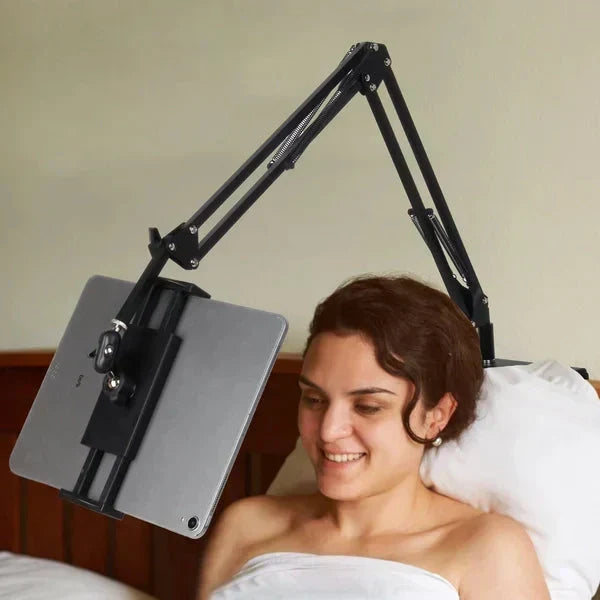
1Fits Suitable Gaps
Insert the base into a stable gap near a headboard, sofa, or desk for a low-profile setup.
WELCOME!
FREE SHIPPING FOR ORDER OVER $49.99
WELCOME!
FREE SHIPPING FOR ORDER OVER $49.99
WELCOME!
FREE SHIPPING FOR ORDER OVER $49.99
WELCOME!
FREE SHIPPING FOR ORDER OVER $49.99
WELCOME!
FREE SHIPPING FOR ORDER OVER $49.99
WELCOME!
FREE SHIPPING FOR ORDER OVER $49.99
WELCOME!
FREE SHIPPING FOR ORDER OVER $49.99
WELCOME!
FREE SHIPPING FOR ORDER OVER $49.99
WELCOME!
FREE SHIPPING FOR ORDER OVER $49.99
WELCOME!
FREE SHIPPING FOR ORDER OVER $49.99
WELCOME!
FREE SHIPPING FOR ORDER OVER $49.99
WELCOME!
FREE SHIPPING FOR ORDER OVER $49.99
WELCOME!
FREE SHIPPING FOR ORDER OVER $49.99
WELCOME!
FREE SHIPPING FOR ORDER OVER $49.99
WELCOME!
FREE SHIPPING FOR ORDER OVER $49.99
WELCOME!
FREE SHIPPING FOR ORDER OVER $49.99
You're $50 away from FREE shipping!
Couldn't load pickup availability

Position a phone or tablet beside the bed, sofa, or desk with an articulated alloy arm built for suitable furniture gaps or flat surfaces.

The upgraded hidden design supports discreet positioning without requiring a clamp directly on your furniture.

Insert the base into a stable gap near a headboard, sofa, or desk for a low-profile setup.
Place the upgraded stand on a suitable flat tabletop when gap installation is not practical.
Elastic foam on the bottom and back of the metal bracket helps protect adjacent furniture and wall surfaces.
The articulated arm accommodates different postures and viewing positions throughout the day.

Move the arm across four connected joints to bring the screen toward a comfortable line of sight.
Three tension adjusters offer added control during positioning, while the final joint rotates 360 de
An alloy arm, multiple adjustment points, and two placement methods create versatile support for everyday viewing.

Use the four connected joints to move your screen closer to your preferred viewing position.
Adjust tension at three joints while setting up or repositioning the articulated arm.
Rotate the final joint through 360 degrees to fine-tune the device holder orientation.
Arrange your device for relaxing, working, reading, or browsing without continuously holding it.

Position the stand beside a sofa or desk to keep the screen within your preferred viewing area.
Readjust the jointed arm when you lean back, sit forward, or change your posture.
A suitable headboard gap can provide a convenient placement point for viewing while lying down.
Choose a stable placement that matches your furniture, available space, and preferred viewing position.

Choose between basic clip-on and upgraded hidden designs, with holder options suited to different device types.

Select a basic clip-on version when a traditional clamping setup suits your furniture and preferred
Choose the upgraded hidden version for a suitable gap or flat tabletop, then select the holder inten
Detailed adjustment and multiple setup options help the stand adapt as your space, device, or posture changes.

Use a suitable furniture gap or position the upgraded stand on a stable, flat tabletop.
Four joints, three tension adjusters, and a rotating final joint support precise positioning.
Elastic foam lines the bottom and back of the inserted bracket to help protect adjoining surfaces.
A quick check of your intended location and device type will help identify the most suitable configuration.

Choose a traditional clip-on base or the upgraded hidden gap-and-tabletop design.
Confirm that your intended location offers a suitable, stable mounting gap or flat surface.
Select the phone-only or phone-and-tablet holder for the device you plan to use.
A simple view of the information supplied for this product.
Thoughtful placement and adjustment help maintain a comfortable viewing angle while respecting the stand and surrounding furniture.
Clear answers based on the supplied product information.
Yes. The upgraded design can also be placed directly on a suitable, stable flat tabletop.
The arm has four connected joints. Three include tension adjusters, and the final joint rotates through 360 degrees.
Phone-only and phone-and-tablet holder versions are listed. Choose the appropriate holder and confirm fit for your specific device before use.
Elastic foam is fitted to the bottom and back of the metal bracket where it contacts nearby furniture or wall surfaces.
Choose the stand and holder configuration that fits your device, furniture, and preferred way to watch, browse, read, or work hands-free.