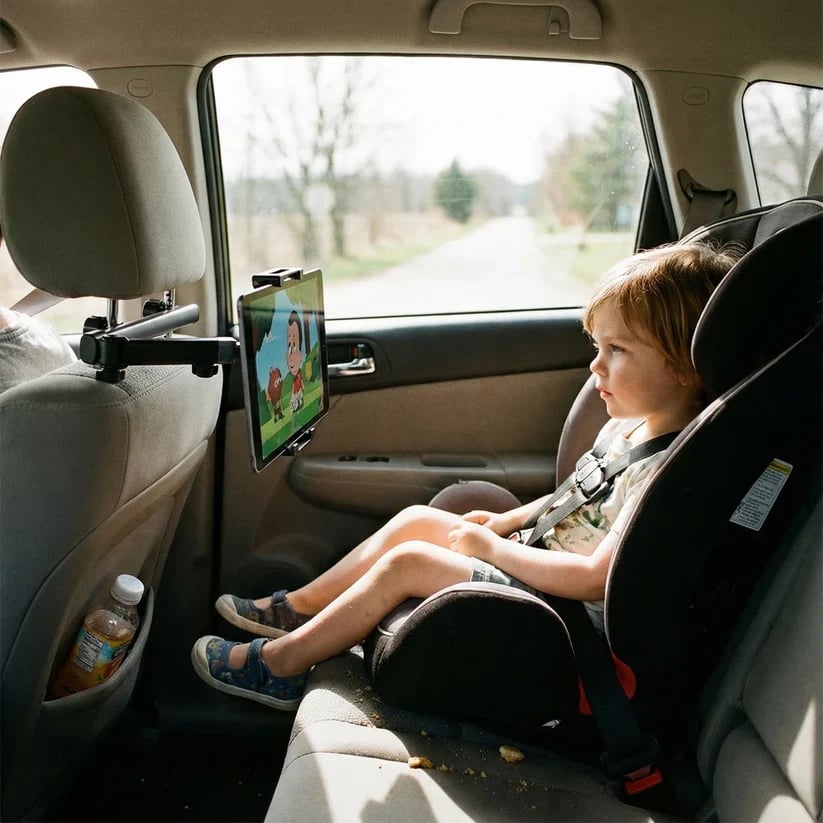
Less Holding, More Watching
Passengers can enjoy a show without holding a tablet in their lap.
WELCOME!
FREE SHIPPING FOR ORDER OVER $49.99
WELCOME!
FREE SHIPPING FOR ORDER OVER $49.99
WELCOME!
FREE SHIPPING FOR ORDER OVER $49.99
WELCOME!
FREE SHIPPING FOR ORDER OVER $49.99
WELCOME!
FREE SHIPPING FOR ORDER OVER $49.99
WELCOME!
FREE SHIPPING FOR ORDER OVER $49.99
WELCOME!
FREE SHIPPING FOR ORDER OVER $49.99
WELCOME!
FREE SHIPPING FOR ORDER OVER $49.99
WELCOME!
FREE SHIPPING FOR ORDER OVER $49.99
WELCOME!
FREE SHIPPING FOR ORDER OVER $49.99
WELCOME!
FREE SHIPPING FOR ORDER OVER $49.99
WELCOME!
FREE SHIPPING FOR ORDER OVER $49.99
WELCOME!
FREE SHIPPING FOR ORDER OVER $49.99
WELCOME!
FREE SHIPPING FOR ORDER OVER $49.99
WELCOME!
FREE SHIPPING FOR ORDER OVER $49.99
WELCOME!
FREE SHIPPING FOR ORDER OVER $49.99
You're $50 away from FREE shipping!
Couldn't load pickup availability

Bring entertainment within comfortable view with an adjustable headrest holder for tablets and phones.

Make back-seat entertainment easier to manage throughout the ride.
Passengers can enjoy a show without holding a tablet in their lap.
Adjust the arm and angle to suit the passenger's seated position.
A dedicated holder gives the screen a defined place during travel.
Keep familiar shows available for the quieter stretches of a family trip.
The everyday idea is straightforward: position the screen before departure and let passengers settle in.
Mount the device while everyone is preparing for the journey.
The adjustable arm offers more positioning flexibility than placing a screen directly against the headrest.
The adjustable grip accommodates a range of tablets and smartphones.
Remove the holder when it is no longer needed or when changing vehicles.

A few practical checks help you decide whether this holder suits your vehicle and device.

Look for accessible headrest rods where the mounting clamp can attach.
Confirm the holder's current fit specifications against your phone or tablet before ordering.
Consider where the screen should sit relative to the back-seat passenger.
Allow room for the holder and device without interfering with seating or restraint components.
With the vehicle parked, check the attachment, device grip, and viewing angle.
Set up the holder while parked, before the journey begins.
Secure the mounting clamp to a compatible headrest without tools.
Adjust the holder around the device and check that it is firmly seated.
Position the extendable arm, then tilt or rotate the screen for the passenger.

Six details explain how the holder supports back-seat viewing.


Designed to support a mobile screen for back-seat passengers.
The mount connects to compatible rods beneath a vehicle headrest.
The arm allows the screen's distance from the headrest to be adjusted.
Rotate the screen to suit the content being displayed.
Change the screen's tilt to refine the viewing position.
The lightweight holder is easy to remove and carry between trips.
Explore device, orientation, and placement possibilities within the holder's fit limits.
Use a compatible tablet for shows and other visual entertainment.
A compatible smartphone offers an alternative when a tablet is not coming along.
Position the device horizontally for content designed around a wider view.
Rotate the device upright when that orientation suits the app.
Extend the arm when the passenger's seating position calls for more reach.
Reduce the arm's reach when less extension is needed.
A change in angle may help when daylight reflects across the screen.
The removable design can suit different vehicles when each headrest is compatible.
Use these checks to keep the setup suited to your passenger and vehicle.
Before each trip, check the headrest mount and the grip holding the device.
Check fit with the case you intend to use; added bulk can affect how a device sits.
Choose a position that gives a clear view while preserving space around the passenger.
Stop safely before changing the mount or retrieving a device.
Take the device out before removing the holder from the headrest.
A practical accessory for families who bring screens along.
Give back-seat passengers a mounted screen for entertainment along the route.
Set up familiar content before heading across town or farther from home.
Use the holder on everyday journeys when back-seat screen time is part of the plan.
Bring the removable holder along and check compatibility before using it in another car.
Choose with the recipient's vehicle and device in mind.
A useful idea for a parent organizing back-seat entertainment before a holiday.
Consider it for grandparents who regularly drive children in a compatible vehicle.
An everyday accessory for someone who often brings young passengers along.
Give it early enough for the family to check fit and try the setup before departure.
Fictional review-style examples of how the holder could fit into family travel.

I like having the tablet in one place instead of balanced on a backpack. We set the angle before leaving.

Being able to bring the screen closer helped us find a better position for our back-seat setup.

I wanted something I could remove after a trip. The tool-free setup fits the way our family uses the car.
It attaches to compatible headrest rods and is intended for many cars, SUVs, and family vehicles. Check your headrest design and the current mounting specifications before ordering.
Yes. The adjustable grip is designed for a range of tablets and phones. Confirm that your device, including its case, meets the holder's current fit specifications.
Yes. The extendable arm lets you adjust the screen's distance from the headrest.
Yes. The holder supports rotation and tilt so you can adjust orientation and viewing angle.
No tools are required for attachment to a compatible headrest. Install it and check the grip while the vehicle is parked.
Yes. The holder is designed to be removable and portable. Check compatibility again before moving it to another vehicle.
Choose a flexible place for your family's tablet or phone, with fit and positioning checked before you go.
Use the checkout details to confirm your purchase.
Review the payment options displayed at checkout and choose the method that suits you.
Check the product, quantity, contact information, and delivery address before submitting.
Review the delivery information shown for your destination.
Include any apartment or unit details needed for delivery.
Review any available estimate before ordering for a specific trip.
Save the confirmation and refer to any shipment updates provided.
Focus on what matters for your family's setup.
The holder provides hands-free screen viewing for back-seat passengers.
Device and headrest checks help you make an informed selection.
Extension, tilt, and rotation address different parts of screen placement.
Review checkout, delivery, and service terms alongside the product details.
Keep the applicable store terms and your order details handy.
Seek clarification on device or headrest compatibility if you are unsure.
Check its condition and moving parts before setting it up.
Check attachment and device placement before using the holder on a journey.
Have your order information and a clear description ready when contacting the store.
Consult the published return and service terms for eligibility, conditions, and next steps.